概述
record_stream是 PyTorch 中用于管理 CUDA 流之间Tensor生命周期和依赖关系的一个关键机制。它的核心目的是确保在异步执行的 GPU 操作中,数据的一致性和正确性,防止因操作重叠导致的数据损坏或计算错误。
为什么需要 record_stream?
要理解 record_stream,首先看一下 CUDA 流的相关概念:
- CUDA 流:可以看作是 GPU 上的一个“任务队列”。提交给同一个流的操作会按照先进先出的顺序异步执行;
- 异步执行:CPU 将任务提交给 GPU 的某个流后,不会等待 GPU 完成就直接返回,继续执行后续的 CPU 代码;
- 多流并行:允许创建多个流,让 GPU 同时执行来自不同流的任务,从而实现更高层次的并行。
为什么会出现计算错误?举个例子:
假设Stream A是一个通信流,负责通过all-gather收集一个TensorT,Stream B 是一个计算流,负责使用Tensor T 进行计算。由于操作是异步的,CPU 在发起拷贝后立刻就去提交计算任务,此时 Stream A 的拷贝操作很可能还没完成。如果 Stream B 开始读取 T,它可能会读到不完整或错误的数据,导致计算结果错误。
再看一个例子,如果CPU下发Tensor的相关计算指令后,认为该Tensor可以删除,执行了del命令,但相关kernel内的计算还没有完成,也有可能导致计算过程中读取到错误的数据,从而导致计算错误。
当使用T.record_stream时,会强制等待该流,之后再进行其他流的操作;尝试释放时,也会等待这个流,此时申请的内存不是真正的被释放了,防止出现数据踩踏或读取脏数据。
T.record_stream(s1)
record_stream原理
查看record_stream源码,发现与Caching Allocator相关
void record_stream_cuda(Tensor& self, c10::Stream stream) {
  struct c10::StreamData3 data = stream.pack3();
  c10::cuda::CUDACachingAllocator::recordStream(self.storage().data_ptr(), at::cuda::CUDAStream::unpack3(data.stream_id, data.device_index, data.device_type));
}
record_stream会在Tensor对应的Block中插入一个event,并根据使用的流数增加引用计数,即使 CPU 端引用归零,Caching Allocator也会拦截释放请求,将该显存块标记为“流占用”状态并移入待回收队列,同时持续轮询该流的执行状态。只有当确认流中所有任务完全结束时,Caching Allocator才会真正将显存释放(也不是真正的释放,指可以被复用)。
查看Caching Allocator中的源码:
  void recordStream(Block* block, cuda::CUDAStream stream) {
    std::lock_guard<std::recursive_mutex> lock(mutex);
    if (stream.stream() == block->stream) {
      return;
    }
    block->stream_uses.insert(stream);  // 记录使用这块block的流
    if (C10_UNLIKELY(!captures_underway.empty())) {
      block_to_cudagraph_stream_uses[block].insert(stream);
    }
  }
通过block->stream_uses.insert(stream); 记录下所有使用这块block的流。单单只是记录并不能强制同步,找一下是哪里插入这个event的,发现Caching Allocator中通过insert_events 函数对block所在的流插入event并实现引用计数:
  void insert_events(Block* block) {
    ....
    stream_set streams(std::move(block->stream_uses)); // 读取刚刚记录的流
    for (auto& stream : streams) {
      EventPool::Event event = create_event_internal(stream.device_index());
      C10_CUDA_CHECK(cudaEventRecord(*event, stream.stream())); // 插入event

      block->event_count++; // 引用计数
      cuda_events[stream].emplace_back(std::move(event), block);
    }
    ....
  }
insert_events在一个block尝试被free的时候才会被调用,意思是说当尝试free一块内存时,Caching Allocator会先查找是否被多个流使用,一旦被多个流使用就不能被轻易free,需要在对应的流上插入event并记录:
  void free(Block* block) {
    ....
    if (!block->stream_uses.empty()) {
      if (C10_UNLIKELY(!captures_underway.empty())) {
        .... // 尝试复用(挖个坑🕳️)
      } else {
        insert_events(block); // 插入event
      }
    ....
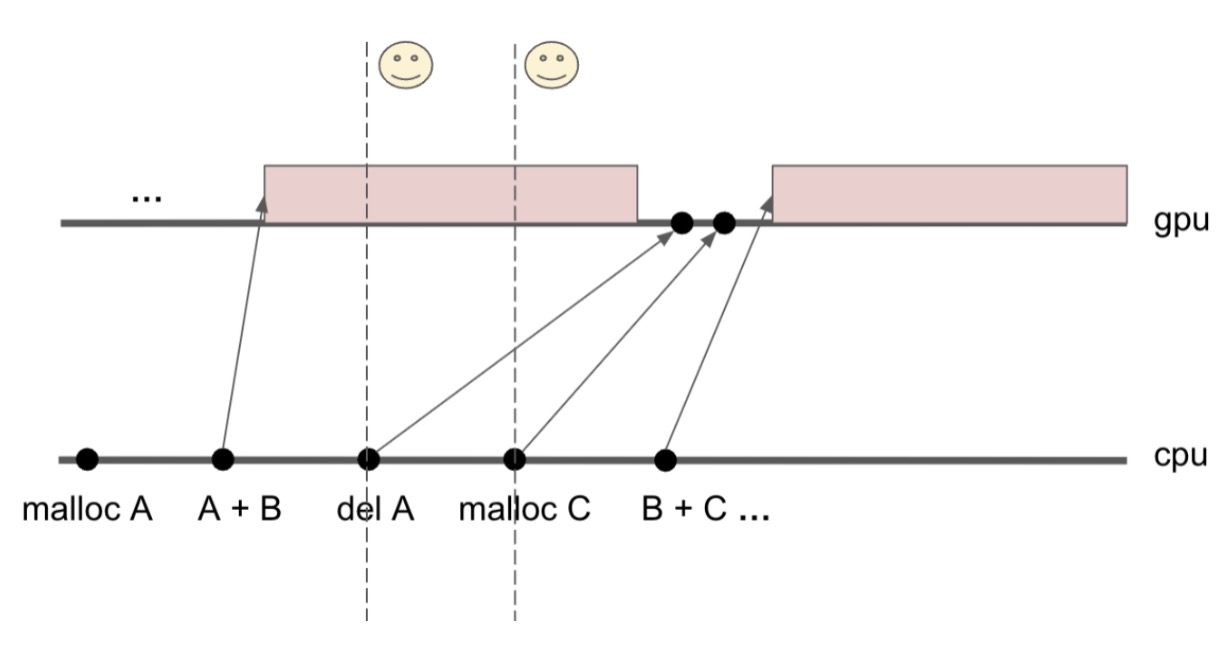
参考社区的这张图,del的event会被插入流当前执行的位置,一旦前面的操作都执行结束了,这条流上的event就可以被触发了。
思考几个问题:
- 怎么判断event被触发了? 答案是轮询
- 怎么触发轮询?
- 轮询的频率是什么?
先看一下轮询是怎么进行的,以及轮询后是怎么释放block的。caching allocator会通过cudaEventQuery轮询对应的event是否被结束,如果结束,对应的计数-1,直到计数为0,标志着block终于可以被正确的free了。
  void process_events(const std::shared_ptr<GatheredContext>& context) {
    insert_events_deferred_until_no_capture(context);
    for (auto it = cuda_events.begin(); it != cuda_events.end();) {
      while (!it->second.empty()) {
        auto& e = it->second.front();
        EventPool::Event event = std::move(e.first);
        Block* block = e.second;

        cudaError_t err = C10_CUDA_ERROR_HANDLED(cudaEventQuery(*event)); // 轮询
        if (err == cudaErrorNotReady) {
          // ignore and clear the error if not ready
          (void)cudaGetLastError();
          // Return the ownership of the Event (unique ptr)
          e.first = std::move(event);
          break;
        } else if (err != cudaSuccess) {
          C10_CUDA_CHECK(err);
        }

        block->event_count--;  // 引用计数-1
        if (block->event_count == 0) {
          free_block(block, context); // 如果引用计数为0,正确free
        }
        it->second.pop_front();
      }

      if (it->second.empty()) {
        it = cuda_events.erase(it);
      } else {
        it++;
      }
    }
  }
看一下轮询是在哪里被触发的?结论是在每次malloc的时候,那么轮询的频率也确定了,就是每当尝试申请一块新的block时,系统会尝试查看是否存在被多流使用的block已经可以free了,如果是,那么会尝试复用它。
  Block* malloc(
      c10::DeviceIndex device,
      size_t orig_size,
      cudaStream_t stream) {
    ....
    if (C10_LIKELY(captures_underway.empty())) {
      process_events(context); //轮询
record_stream的局限性
record_stream能很好的实现同步,防止数据踩踏,那么它的机制是否隐含了它的一些局限性呢?首先轮询会导致一点点性能下降,另一方面由于释放变慢了,导致block的生命周期变长了,那么可能会导致一些显存的峰值。如图所示:
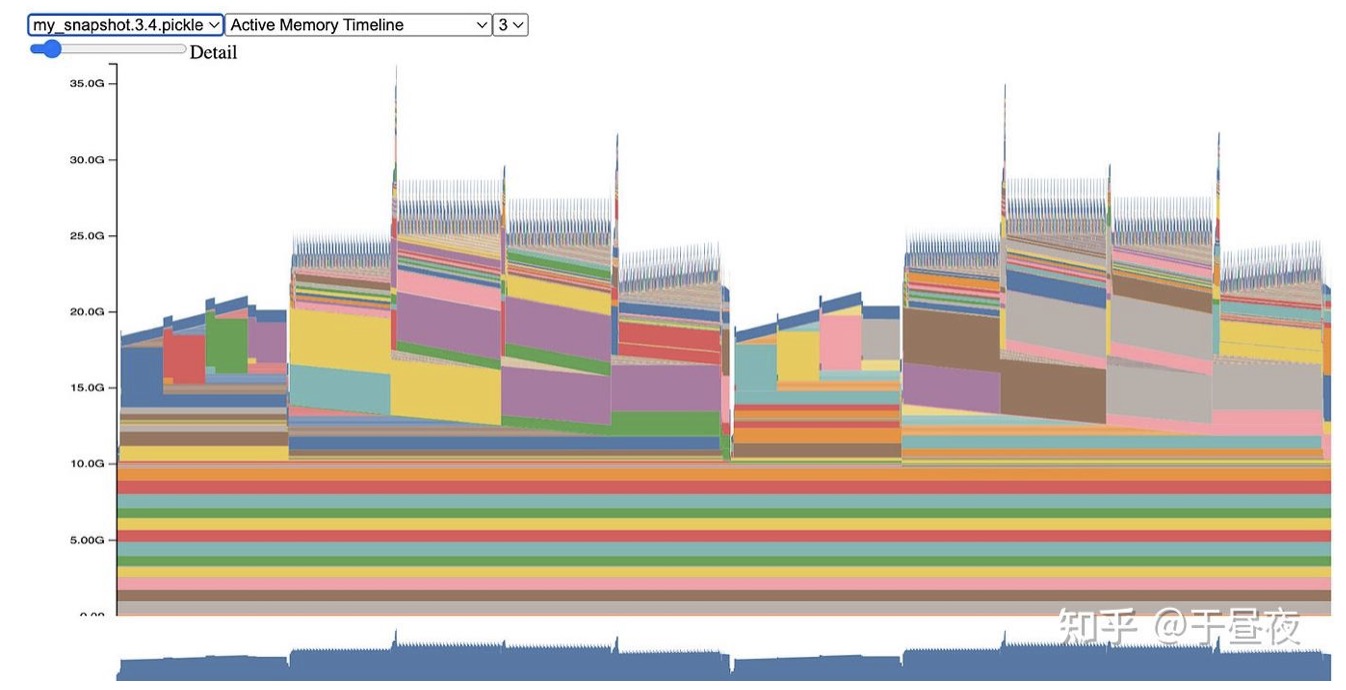
显存峰值
这也是为什么FSDP2中不再继续使用record_stream管理生命周期的一部分原因,可以参考专栏的另一篇文章:PyTorch FSDP2 对比 FSDP1的升级,看内存复用问题是怎么产生以及怎么被一步步解决的。
Reference
https://github.com/pytorch/pytorch/blob/main/c10/cuda/CUDACachingAllocator.cpp
https://dev-discuss.pytorch.org/t/fsdp-cudacachingallocator-an-outsider-newb-perspective/1486